AI Usage Disclaimer
This post was last updated on Nov 10, 2026.
Hello people!
Sorry for not posting this sooner. This post has been sitting in draft for the past 2, 3, 4, 5, 6, 7 weeks. Mostly because I have not been feeling well for the last few weeks and then it's just being procrastinated to the max. So if you're reading this...we're soo back!
This log will probably be too long. I've been working almost 16 hours a day for the past month, and I've made significant progress with:
Instead of making this post a boring aggregated changelog of my projects, I'll limit myself to sharing only the highlights.
vylk
I've been spending most of my time building vylk. The two biggest additions since I last talked about it are:
- distraction-free Zen Mode editor
- keyboard shortcuts
- end-to-end encryption of notes across devices, and
- a shiny landing page.
All of these features are very new, and even though I've been using this app daily, there's only so many edge cases I can hit. But I am a firm believer of
"with time, things will only get better."
It's so nice to have a single binary that you can just download and just run for yourself for ~it only costs $2/year on tierhive (no affiliation, I just found the cheapest option where vylk can be deployed). I think we might get away with an AWS lambda that wakes up like x times a day, but I haven't tried that yet.
I've also worked on making vylk a bit more resilient. Now for a given vylk.db and NOTES_DIR, vylk can automatically resume the server. This architectural change helps significantly with servers that have questionable uptime. We're already offline-first, so the server being down is not really a concern. However, the concern of losing notes irrecoverably is real - normal cheap VPS offerings don't give durability guarantees, but bezos does - with S3.
Another thing I've been meaning to add is optional BYOK(Bring Your Own Key) AI - of course with one killswitch to turn it off, or even via config. It can act as Grammarly, it can help me break down my tasks into actionable steps, and so on. I swear AI powered Todo App was not on my 2026 bucket list, but here we are. It's a small feature, but I think it'll be really useful.
After that I plan to pause features and work on stability, and polished UX, but that's for the future.
Quick Update: Yes, BYOK-AI is happening, even a 2.5B parameter local model sort-of works right now. Also, I can see why local LLMs have not taken over the world yet.
glesha
This project started out as a curiosity to learn golang and the architecture of S3. I wrote the first version of the CLI by hand with zero AI involved - and I got it to a point where it had multipart-uploads with concurrent HTTP requests, building a gzipped tar archive by walking the directory tree and maintaining filesystem metadata as we walk.
I spent weeks reading the S3 HTTP API reference, computing header signatures for each request, hashes, splitting up the archives into parts, and goroutines to upload the parts in parallel. Btw, fun fact - I also managed to hit HTTP 500 from S3's API.
It worked as an MVP, so I left it at that.
Then I decided I actually want glesha to be usable - by me and now probably you too - if you're spending money on iCloud or Google Drive subscriptions - especially when you can categorize your data into -
- need frequently
- need maybe once a year
- maybe once a decade
- maybe once I'm a grandpa
categories - you'll save a lot of money, and on top of that there are durability guarantees by bezos - especially after the infamous google drive incident, it's worth considering.
Alright, so after seeing my old CLI API from an end-user's perspective, it didn't make any sense, and I could spend months - polishing the UI, changing the CLI APIs, adding more tests - you see the pattern? Grunt work - nothing new to learn.
So I did a complete rewrite, now with AI assisted development. I also didn't want to rely on hitting random edge cases by avoiding the S3 SDK and continuing to write HTTP APIs from scratch, so this time, we do use it.
The original by-hand version took around 2 months on-and-off, and the AI assisted complete-rewrite took around 3 days on-and-off, but mostly it was because I was hitting the 5h usage limit on my $20 codex plan.
Btw if you're curious, one difference between glesha and the rest of the backup tools is - glesha's goal is to optimize for AWS storage costs and archival data - data that you might not need frequently. And for AWS, having one large file is cheaper than too many small files - hence archiving.
With this rewrite, glesha supports full AND incremental backups of a directory and also stores the file catalog metadata and state into sqlite databases that we keep in the normal storage tier - since they're accessed frequently.
I've since backed up about ~100G of my data that I will rarely need - maybe once a decade. I still use Google Drive's free 20G and then gradually move from my phone/laptop to AWS deep archives.
counter-api
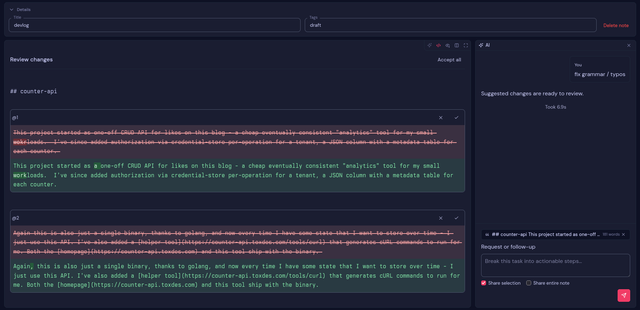
This project started as a one-off CRUD API for likes on this blog - a cheap eventually consistent "analytics" tool for my small workloads. I've since added authorization via credential-store per-operation for a tenant, a JSON column with a metadata table for each counter.
Again this is also just a single binary, thanks to golang, and now every time I have some state that I want to store over time - I just use this API. I've also added a helper tool that generates cURL commands to run for me. Both the homepage and this tool ship with the binary.
syncdash
The today's activity widget you see on the homepage of my website uses syncdash - a lightweight native Android app that uses the Health Connect API to read the step count, active calories, and distance that it gets from my cheap MI smartwatch - and posts it to counter-api at configurable time intervals. syncdash creates one counter for a day - for historical data - and one global counter for today's steps - updated at configurable intervals.
promptr
I was so motivated about this project for a couple of weeks after I wrote this post but I went so deep into a rabbit hole that it eventually boiled down to building a harness, something like T3 Code, and I simply don't have either the need or the resources to build something like that. There's no fun in that.
However, there's still a need for something that can help me write a faster version of ChatGPT. And this is where I'm going: plugins where one could potentially write a proxy-adapter to mimic what chatgpt.com sends - and use that for the conversation. This is just an example, but let's see how things go.
The last time I was working on this app before I abandoned it, I was using deepseek v4 flash and NGL, we got pretty far. But the worst mistake I think I've made is choosing GTK; so far it hasn't gotten in my way of building the UI the way I want it.
yesb
In the last few years, the install-via curl example.com/install | sh pattern of distributing CLI tools has taken over the traditional approach, and even though I don't like scripts doing stuff to my ~, now I understand why that is so.
This video explains really well the pain involved, and it was very similar for me too, when I first started using Linux. I was so spoon-fed with next->next->I agree->install by Windows that getting anything installed that wasn't in apt meant a steep mountain to climb.
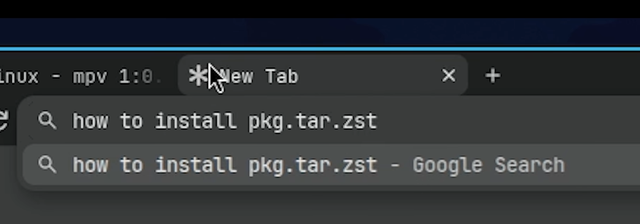
I recently (ok not so recent) went through the hassle of publishing my apps to my own apt/dnf/aur repositories and now it kinda makes sense why the world moved towards the curl | sh pattern.
yesb is just a bunch of Python scripts that let you publish your apps to apt/dnf/aur so that users can install it with ideally 1 command if the app gets popular and gets into official repositories, or stays a 1 user app, and users can still install with 2 commands, and if you have multiple apps, it's 1 command amortized. The name is inspired by nob.h; because yesb is opposite of what nob.h aims to be.
Without getting into more implementation details, yesb uses docker and the buildx extension to cross-compile binaries across different architectures and uploads the artifacts to Cloudflare R2. It supports publishing to homebrew and docker. yesb is language-agnostic; release.toml specifies which artifacts to add and which platforms to publish to. I'm using it to publish mousr, glesha, vylk and promptr for now. This also means curl | sh works by default too.
I know all of this can be avoided if we use appropriate images via GitHub's runners, but I want to reduce the GitHub dependency as much as possible.
Alright, that's about it for now. I hope the next devlogs won't be delayed like this one was.
Until next time :^)
Interesting links
By the way, if you're interested, you can check out all devlogs here.
Edits
- change
glesha can be deployedtovylk can be deployed.